




Track AI Usage
from macOS Menu Bar
Track the AI usage, credits, limits, and subscriptions that matter to you. All at a glance in the menu bar, with reset countdowns and no guesswork.
Free and open source · macOS 15+ · No account or sign-up
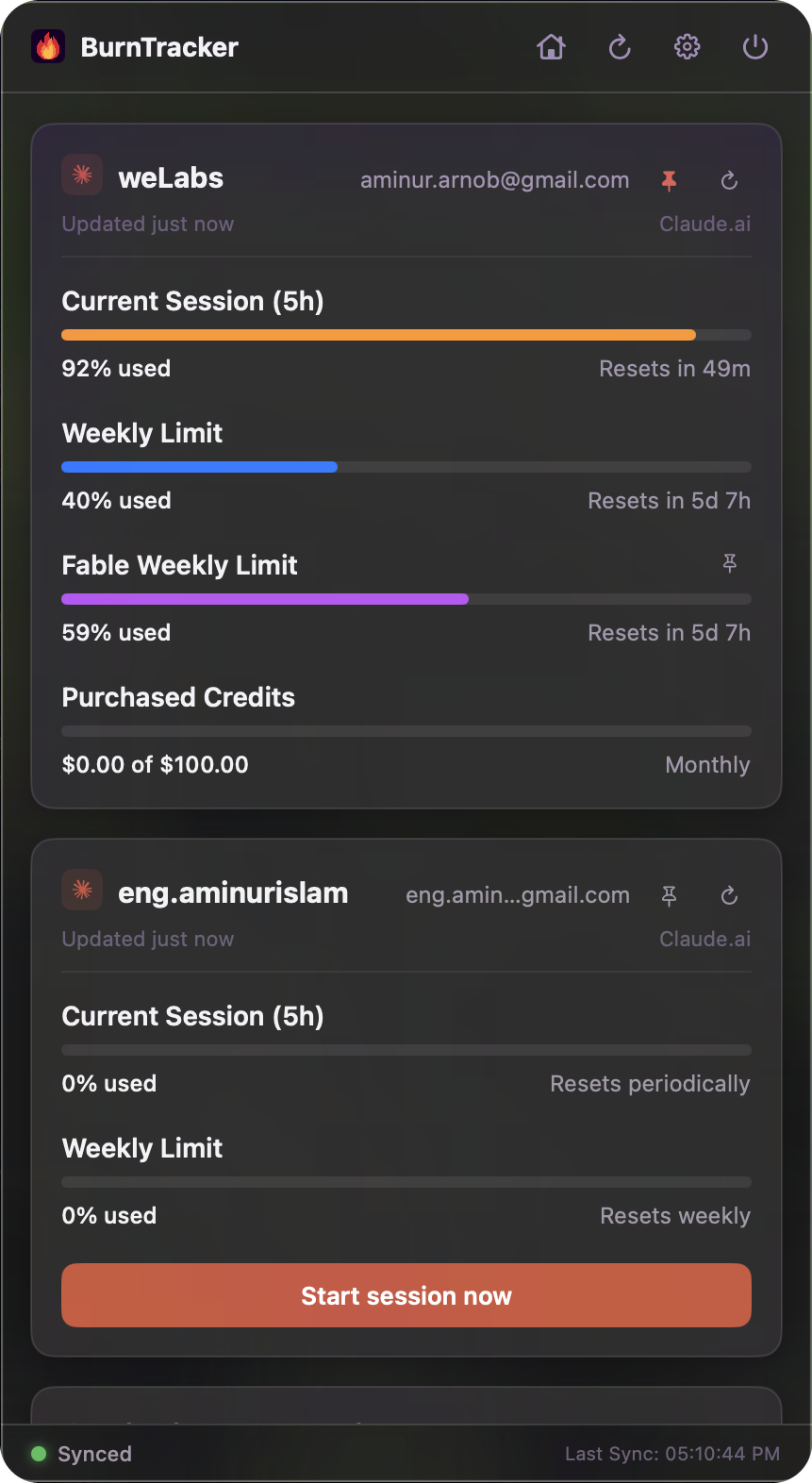
Glassy UI
Native macOS vibrancy
Three AI providers
Claude, Antigravity, Command Code
Auto-refresh
Background syncing and alerts
100% local
Straight to Anthropic and Google
Coverage
Built for Your
AI Coding Stack
Track the subscriptions you actually pay for, all in one menu bar.
Claude Code
Antigravity
Command Code
More providers on the way — everything in the app is plugin-driven.
What it does
Everything You Need to
Stay Under the Limit
Built to feel like a native Apple utility: quiet until you need it, glanceable when you do.
Lives in the menu bar
Left-click the burst icon to toggle the widget, right-click for quick actions. There's no Dock icon to lose it behind.
Connect Claude Code in one click
Link the account Claude Code is signed in to on this Mac - no cookie to copy, and it stays signed in. Personal, Work and Enterprise session-key accounts sit beside it in one list.
Configurable auto-refresh
Syncs in the background every 5 to 60 minutes, and instantly the moment you open the widget. Your choice which.
Antigravity and Command Code
Tracks local CLI quota too - Antigravity's Gemini and Claude/GPT pools, and Command Code credits - on their own cards beside your Claude limits.
Direct session starts
For an idle account, start a fresh session straight from the menu bar - an isolated Claude chat for session-key accounts, or Claude Code in Terminal for your Mac's own login.
Claude usage trend
An interactive 30-day spend and token graph read from your local Claude Code logs. Hover any day for its exact totals, plus Today, Yesterday and Last 30 Days.
Purchased credits
Claude's pay-as-you-go extra usage balance sits right on the card - spent against monthly limit - from the moment you enable usage credits.
Arrange it your way
Pin any one reading to the menu bar - a provider's 5-hour usage, or a single model's weekly cap - and drag the cards into whatever order suits you. Both stick across restarts.
Per-model weekly limits
Fable's weekly cap gets its own bar beside the all-models limit, on the accounts that actually have one. Pin it or let it alert you at your threshold, exactly like any other quota.
Get started
Up and Running in
Three Steps
No account, no sign-up, no server in the middle. Three steps and it's watching your limits.
- Step 01
Connect Claude Code, or grab a session key
Signed in to Claude Code? Click Connect Claude Code in Settings and you're done. For other accounts, copy the sessionKey cookie from claude.ai's DevTools - it starts with sk-ant-sid02.
- Step 02
Add an account
Click the gear icon, label the account something like Personal or Work, paste the key and hit Add Account.
- Step 03
Watch your limits
The widget syncs live and shows your 5-hour session and weekly usage with reset countdowns. Add as many accounts as you like.
Questions
Common Questions
About BurnTracker
What is BurnTracker?
BurnTracker is a free, open-source macOS menu bar app that tracks how much of your AI coding usage you have left. It shows Claude.ai 5-hour session and weekly limits for as many accounts as you add, alongside Antigravity and Command Code quotas, with a reset countdown on each one.
Which AI providers does BurnTracker track?
Three: Claude (Claude.ai and Claude Code), Antigravity and Command Code. Claude is the deepest of the three - multiple accounts, per-model weekly caps, purchased credit balance and a 30-day spend trend - while the other two report their local quota on their own cards.
Is BurnTracker free?
Yes. BurnTracker is free and open source, with no account, sign-up, subscription or paid tier. You can download the signed .dmg or build it from source.
Does BurnTracker send my Claude session key anywhere?
No. Session keys are stored locally in your home directory, under ~/.claude/tracker-settings.json, and are sent only to Anthropic's own endpoints when BurnTracker refreshes your usage. There is no BurnTracker server and no middleman.
Can BurnTracker track more than one Claude account?
Yes, and there is no limit on how many. Personal, Work and Enterprise accounts are consolidated into a single card, each with its own label, session and weekly bars. You can rename an account or rotate an expired session key inline, and it re-validates automatically.
Does BurnTracker show Claude Code spend?
Yes. It reads your local Claude Code logs to draw an interactive 30-day spend and token graph, with per-day totals on hover plus Today, Yesterday and Last 30 Days summaries. Your pay-as-you-go purchased credit balance appears on the account card once usage credits are enabled.
What does BurnTracker require?
BurnTracker runs on macOS 15.0 or later and is a native Swift and SwiftUI app, distributed as a signed disk image for Apple Silicon and Intel Macs. It is signed to run locally rather than notarized, so macOS blocks the first launch until you clear the download quarantine flag - see the next question.
Why does macOS say BurnTracker cannot be opened or checked for malware?
Because the build is signed to run locally rather than notarized with a paid Apple Developer certificate, so macOS quarantines it on download and shows a "BurnTracker Not Opened" warning. Clear the flag once by running xattr -dr com.apple.quarantine /Applications/BurnTracker.app in Terminal, then open the app normally. If you would rather not use Terminal, open System Settings, go to Privacy & Security, scroll down and click Open Anyway after the blocked launch. Right-clicking the app and choosing Open does not work: that bypass was removed in macOS 15, which is the minimum BurnTracker supports.
How is BurnTracker different from other menu bar AI usage trackers?
BurnTracker goes deeper on Claude rather than wider across providers. Trackers such as CodexBar and OpenUsage cover many more services; BurnTracker covers four, but is the one that tracks unlimited Claude accounts side by side, breaks out per-model weekly caps, shows your purchased credit balance, charts 30 days of Claude Code spend from local logs, and can open a fresh isolated Claude session straight from the menu bar. Pick it if Claude is where your limits actually bite.

Start Using
BurnTracker
A self-signed, notarization-free build for Apple Silicon and Intel Macs. The full Swift source is on GitHub if you'd rather build it yourself, or send a pull request.
Free and open source · macOS 15+ · No account or sign-up